

DeKalb Sycamore Chevrolet - Does the 2026 Chevrolet Trax offer wireless Apple CarPlay and Android Auto for everyday drives around Elgin, IL?
The 2026 Chevrolet Trax builds its cabin experience around technology you will actually use, and that starts with standard wireless Apple CarPlay® and wireless Android Auto™. If you spend a lot of time commuting across Elgin, IL or running errands along Randall Road, the Trax’s cable-free smartphone integration helps you jump in, start up, and go — your maps, calls, messages, and playlists appear where you expect them without extra steps.
Beyond seamless connectivity, the layout in the Trax is refreshingly intuitive. The available 11-inch center HD touch-screen places key apps front and center, and on select trims the 8-inch diagonal color Driver Information Center brings essential driving data into clear view. The combination feels modern without being overwhelming, which is exactly what many small-SUV shoppers want today.
How wireless integration changes daily driving
With wireless Apple CarPlay® and wireless Android Auto™, you do not need to plug in to access your smartphone’s familiar interface. Just start the vehicle, and your apps are ready. Voice commands keep hands on the wheel when you are dictating a quick text or finding a new coffee spot. It is a small upgrade that makes a big difference if your routine includes multiple short hops across town.
Pairing is straightforward, and once connected, the system remembers your device. If your Trax includes available wireless charging, you can top off your phone while keeping the center console tidy. Add the available built-in Wi-Fi®Fi® hotspot and your passengers can stream or hop online without tapping your data plan on longer drives to nearby suburbs.
Screen size, clarity, and ergonomics
The available 11-inch center HD touch-screen is more than a bragging point — it improves visibility and reduces distraction. Large, crisp icons and a horizontal layout make it easier to glance, tap, and get back to the road. On LT and above, pairing that display with the 8-inch diagonal color Driver Information Center means speed, navigation prompts, and driver-assist alerts sit right in your sightline.
Designers angled the controls with the driver in mind while keeping them accessible to front passengers. That matters when a co-pilot is helping with directions or queuing up the next playlist as you head toward the interstate.
What about safety and driver assistance?
Chevy Safety Assist is standard on every 2026 Trax and includes Forward Collision Alert, Automatic Emergency Braking, Front Pedestrian Braking, Lane Keep Assist with Lane Departure Warning, Following Distance Indicator, and IntelliBeam® High Beam Assist. These systems work quietly in the background, offering helpful alerts and support when you need them most — like those quick merges or lane changes that come with suburban traffic patterns.
The intuitive way these systems communicate — visually in the cluster and audibly as needed — helps reduce information overload. It is a thoughtful layer of confidence that pairs nicely with the Trax’s smart infotainment setup.
Set up your Trax like a pro
Spend a few minutes tailoring the technology to fit your routine. It makes a noticeable difference in day-to-day ease.
- Create your driver profile: Save display layouts, audio preferences, and driver-assist settings for each regular driver in the household.
- Customize app tiles: Arrange your most-used apps on the first screen for fewer taps and faster access.
- Fine-tune voice controls: Try a few common commands to see which phrasing the system recognizes best for your accent and cadence.
- Enable alerts thoughtfully: Set guidance and safety alerts to the volume and style you prefer, focusing on clarity without distraction.
- Test wireless charging placement: If equipped, check fit with your phone case to ensure consistent charging on bumpy roads.
These small optimizations pay off, especially if your daily schedule includes multiple stops or shared driving duties across family members.
Real-world usability for suburban life
The Trax’s tech is just one part of a well-rounded package. The compact exterior makes parallel parking in busy lots less stressful, while the interior preserves enough rear-seat room for adults and the flexibility of a 60/40 split-folding seat. The cabin’s layout, materials, and controls come together to feel easy to learn and comfortable to live with, even for first-time Chevy owners.
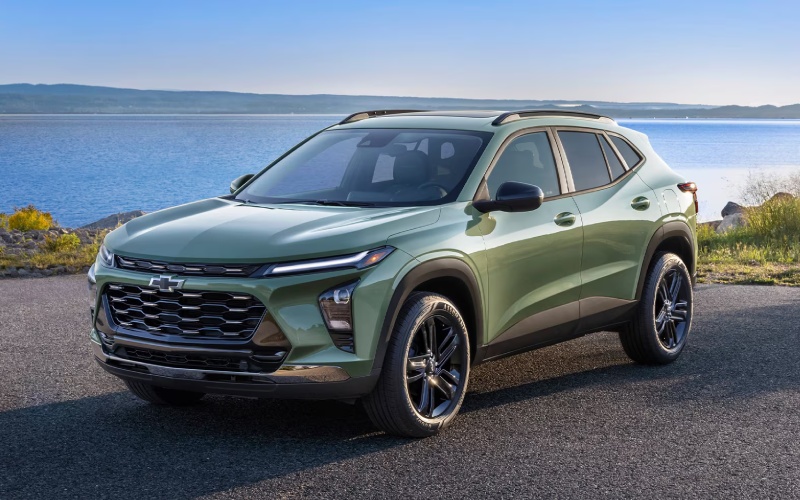
For those who want a more expressive look, trims like 1RS and 2RS bring black bowtie emblems, unique grilles, and upgraded wheels, while ACTIV leans into a bold, confident vibe with Titanium chrome accents and blackout wheels. No matter which direction you go, the technology story stays consistent — wireless connectivity standard, big-screen capability available, and helpful driver aids on every model.
Who should consider the Trax for connected driving?
If you value straightforward technology that does not ask you to re-learn every step, the Trax deserves a serious look. It is an especially strong fit for commuters, new drivers who benefit from standard driver assistance, or households that share a car and need easy device switching. The setups feel familiar, the screens are clear, and the features that matter most are standard.
And because the Trax’s cabin is tuned for calm — with features like Active Noise Cancellation on LS — your podcasts, calls, and navigation prompts come through clearly. It is a subtle perk you will appreciate on longer drives or during busy, stop-and-go periods.
See it in person
There is no substitute for a hands-on demo. Bring your phone, your most-used apps, and a few favorite destinations. Plan a route that mimics your commute, then test voice commands, evaluate screen visibility in bright sunlight, and try the available wireless charging with your everyday phone case.
When you are ready to explore a 2026 Trax with the right tech features for your life, DeKalb Sycamore Chevrolet is here to help — serving Elgin, West Dundee, and Rockford with a straightforward, customer-first experience. We will walk you through trim differences, help you customize settings, and set up a test drive that reflects your routine.
Frequently Asked Questions:
Is wireless Apple CarPlay® and wireless Android Auto™ standard on the 2026 Chevrolet Trax?
Yes. Both come standard on every 2026 Trax, so your maps, music, and messages are ready without plugging in a cable.
Which screen sizes are available?
An 11-inch center HD touch-screen is available, and certain trims also include an 8-inch diagonal color Driver Information Center for key driving info in your line of sight.
Can I get wireless charging and a built-in Wi-Fi® hotspot?
Wireless charging and a built-in Wi-Fi®Fi® hotspot are available. Together with standard wireless smartphone integration, they help keep devices powered and connected on the move.
Are the safety features intrusive?
Chevy Safety Assist is designed to support your driving with clear alerts and gentle interventions. Most settings are adjustable, so you can tailor the experience to your comfort level.